Edit the grump configuration file
nano /etc/default/grubchange GRUB_CMDLINE_LINUX_DEFAULT to
GRUB_CMDLINE_LINUX_DEFAULT="quiet intel_iommu=on iommu=pt pcie_acs_override=downstream,multifunction initcall_blacklist=sysfb_init video=simplefb:off video=vesafb:off video=efifb:off video=vesa:off disable_vga=1 vfio_iommu_type1.allow_unsafe_interrupts=1 kvm.ignore_msrs=1 modprobe.blacklist=radeon,nouveau,nvidia,nvidiafb,nvidia-gpu,snd_hda_intel,snd_hda_codec_hdmi,i915"
Then update GRUB
update-grubNext we need to add vfio modules to allow PCI passthrough.
Edit the /etc/modules file.
nano /etc/modulesAdd the following line to the end of the file:
# Modules required for PCI passthrough
vfio
vfio_iommu_type1
vfio_pci
vfio_virqfd
Update changes
update-initramfs -u -k allReboot Proxmox
Verify that IOMMU is enabled
dmesg | grep -e DMAR -e IOMMU
DMAR: IOMMU enabledGo to the VM on Proxmox and under the Hardware section add a PCI device. Select the iGPU, All Functions, Rom-Bar and click add.
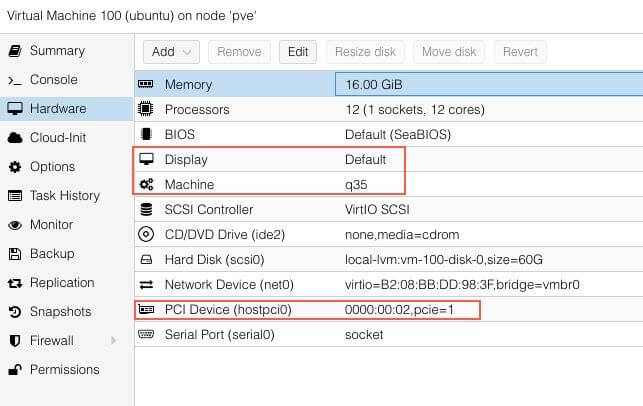
After starting the VM run sudo lspci -nnv | grep VGA and it should output the iGPU.
Next run cd /dev/dri && ls -la and verify that renderD128 is present.